Health Stats: Data & Charts app icon
Health & Fitness · Lifestyle · Free

Apple Health charts app: see the trends hiding in your Health data

Charts, trends and records for 97 Apple Health metrics. Read-only, offline, no account.

  • Free · In-app purchases
  • iPhone · iOS 15+
  • 11.8 MB
  • Age 4+
  • Updated September 2026
  • English

Screenshots

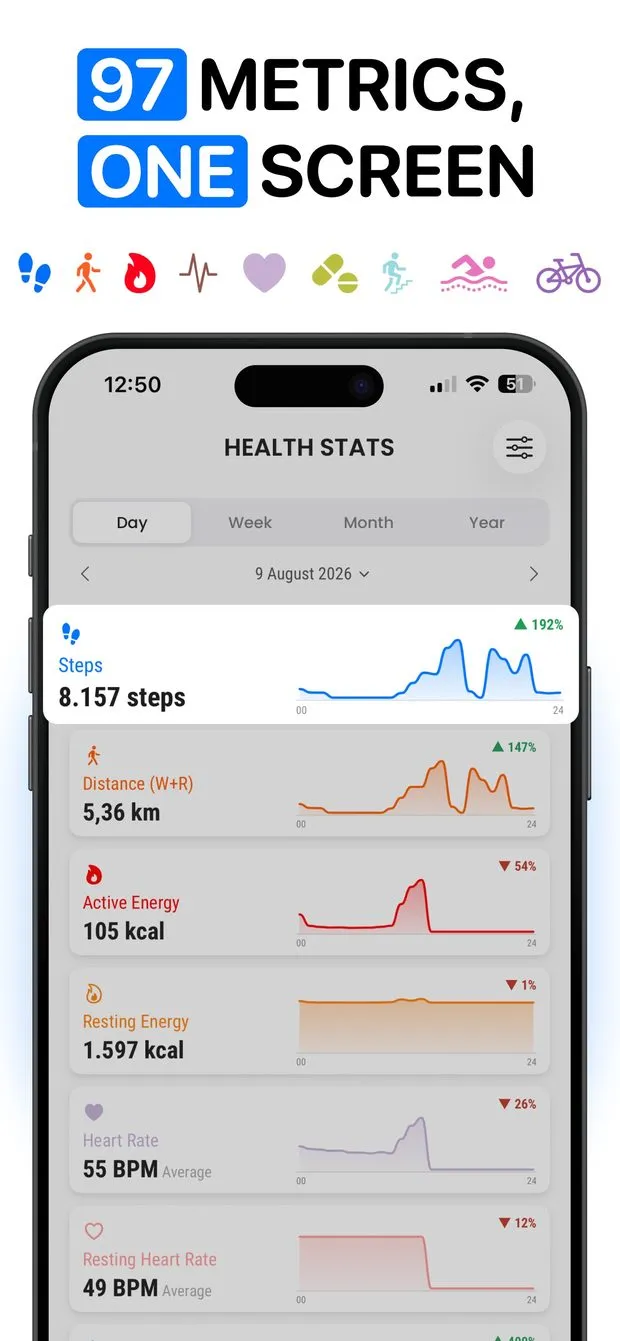
Health Stats dashboard in Day view with charts for steps, distance, active energy, resting energy and heart rate
Steps detail in Week view with a Compare button, written insights, a lowest-median-highest bar and intensity by day
Trackers list with pin icons, palette buttons and colored on/off toggles for steps, heart rate, cycling and swimming metrics
Customize sheet for the Steps metric showing a grid of color swatches and a grid of alternative icons to choose from
Timeline tab for the last month listing every reading by time: walking speed, step length, physical effort, steps, heart rate
Dashboard in Month view with dark mode on, showing August charts for steps, distance, energy, heart rate and flights climbed

Health Stats at a glance

Developer
Burak Köse, independent
Platform
iPhone · iOS 15 or later
Core use case
Charts, trends and records for 97 Apple Health metrics. Read-only, offline.
Key differentiator
97 metrics on one dashboard
Account
None needed
Internet
Works offline
Your data
Stays on your iPhone
Pricing
Free download · optional in-app purchases
Version
1.0.1 · September 2026 · 11.8 MB
Download
App Store

Health Stats is an Apple Health charts app: a viewer for the data your iPhone and Apple Watch have already saved to Apple Health. It charts 97 metrics by day, week, month and year, draws each period over the one before it, and writes short notes about records, weekday patterns and days with no data. It is read-only, and nothing leaves your phone.

97 metrics on one dashboard

Heart rate, HRV, blood pressure, blood oxygen, weight, BMI, every vitamin and mineral, headphone volume. If it is in Health, it gets a chart; 3 free, 94 Pro.

Day, week, month, year

Switch the whole dashboard between four periods and swipe back through history. Every chart redraws, and the previous period can be drawn over the current one.

Insights, records and heat maps

Records broken, weekends versus weekdays, days with no data, plus a lowest-median-highest bar and a heat map for gaps and streaks. Records and insights are Pro.

Read-only, offline, no account

Health Stats never writes to, edits or deletes Health data. No sign-up, no server, no tracking. Nothing leaves your iPhone.

How to see Apple Health trends over time on iPhone

The Health app stores the data; Health Stats shows what it means. Health Stats puts all your Apple Health data in one place, every metric on a single dashboard, and switches the whole screen between Day, Week, Month and Year. Swipe or tap the arrows to move back through history and every chart redraws for that period. Each card shows the total or average plus a percentage change badge, so a 12% drop in average resting heart rate is visible without opening anything.

Open a metric for the full view: a larger chart and a Compare button that draws the previous period underneath. In Month view that is this month against last month; in Year view it is this year against last year, which is the closest thing to an Apple Health year in review you can check on any day. Pin the metrics you check daily to the top, reorder the list, hide what you do not care about, and give any metric its own color and icon.

Apple Health charts app that shows better graphs than the Health app

A line chart tells you where a number went. Health Stats adds five views that say what it means. Comparison lays this period over the one before it. Distribution shows the lowest, median and highest reading for the period on one bar. The heat map shades each day by intensity, so an Apple Health heat map for steps makes gaps and streaks obvious. Insights are written sentences: records broken, the day a metric peaked, a weekend vs weekday steps comparison, and days with no data at all.

Comparison, distribution and the heat map work on the three free metrics too. The written records and insights are part of Pro.

  • Comparison: this week, month or year drawn over the previous one
  • Distribution: lowest, median and highest at a glance
  • Heat map: shaded days that show gaps and streaks
  • Insights: records, peak days, weekday patterns, missing days
  • Sources: which watch, phone or app recorded each number

How to view heart rate history and HRV trends on iPhone

Heart rate, HRV, resting heart rate, blood pressure, blood oxygen and respiratory rate are all among the 97 metrics Health Stats reads from Apple Health. Each gets the same treatment as steps: an average for the day, week, month or year, a percentage change badge, and a chart that redraws for any date you swipe to. Set the dashboard to Year and each card becomes a twelve-month history of what your Apple Watch recorded; tap Compare to draw the previous year underneath. These vital metrics are part of Pro; steps, walking + running distance and active energy are the free three.

For individual readings, the Timeline tab lists every entry Health has, in order, with the time of each one. Scroll back as far as your data goes; each day shows its entry count at the top.

Which app or device recorded my Apple Health data?

When an iPhone, an Apple Watch and a third-party app all write steps, Health merges them and the totals can look wrong. Health Stats has a Sources panel under every metric that lists each watch, phone or app that contributed and the amount that came from it. Double counting, a Watch that stopped syncing, or an app writing stale numbers become easy to spot.

The Timeline tab is the other side of that: every reading in order, day by day and month by month, back as far as your data goes. Each day shows its entry count and every reading with its time, metric and value, so you can trace a strange daily total back to the exact sample that caused it.

Is there a read-only Apple Health viewer that works offline?

Health Stats is a viewer, not a logger. It reads Apple Health and never writes to, edits or deletes a record. There is no account, no sign-up, no server and no tracking, and the app works offline, so the charts come from data that never left the phone.

Steps, walking + running distance and active energy are free, with every chart and every period, which makes it a usable Apple Health dashboard app for iPhone at no cost. Pro unlocks the remaining 94 metrics, the records and insights, and custom colors and icons. The app is iPhone-only, needs iOS 15.0 or later, is an 11.8 MB download and is in English.
Made for

Who Health Stats is for

Apple Watch owners

An Apple Watch heart rate history chart plus HRV and activity by week, month and year, last period underneath (Pro).

Weight and body tracking

Weight, BMI, body fat and waist drawn over time, with this month laid over last month (Pro).

Nutrition loggers

Protein, fiber, sugar, caffeine, water and every vitamin and mineral written to Health by any food app (Pro).

Blood pressure and oxygen

Blood pressure, blood oxygen and respiratory rate on one dashboard, with lowest, median and highest per period (Pro).

Step streaks

A heat map shows the gaps and streaks in your steps; Insights (Pro) flags the record day and your strongest weekday.

Pricing

What is free and what Premium adds

Free No account

  • Steps, with every chart and every period
  • Walking + running distance, with every chart and every period
  • Active energy, with every chart and every period
  • Day, Week, Month and Year views with history
  • Read-only, offline, no account or tracking

Premium In-app purchase

  • The remaining 94 metrics: heart rate, HRV, blood pressure, blood oxygen, nutrition, body measurements and more
  • Records and written insights
  • Custom colors and icons for any metric

Offered as an auto-renewing subscription or a one-time purchase where available. Prices are shown in the app and vary by region.

Information

Health Stats: Data & Charts at a glance

Developer
Burak Köse
Category
Health & Fitness, Lifestyle
Price
Free, with in-app purchases
Compatibility
iPhone · Requires iOS 15 or later
Size
11.8 MB
Languages
English
Age rating
4+
Version
1.0.1 · updated September 20, 2026
First released
September 8, 2026
App Store
Health Stats: Data & Charts
Privacy policy
burakkose.me/privacy
Support
info.bk.apps@gmail.com
FAQ

Health Stats — frequently asked questions

Is there an app that shows better charts for Apple Health data?

Yes. Health Stats reads the data already in Apple Health and charts 97 metrics on one dashboard, switchable between Day, Week, Month and Year. Beyond a line chart it adds a comparison against the previous period, a lowest-median-highest distribution, a heat map for gaps and streaks, written insights about records, and a breakdown of which device recorded each number.

How do I see Apple Health trends over more than a year?

In Health Stats, set the dashboard to Year and swipe back; every chart redraws for the year you land on, which turns the resting heart rate card into a resting heart rate trend over a year. Open any metric and tap Compare to draw the previous year over the current one. The Timeline tab lists every reading in order, back as far as your Health data goes.

Can I view my heart rate or HRV history on iPhone?

Yes, if the readings are in Apple Health, for example from an Apple Watch. Health Stats charts heart rate, HRV, resting heart rate, blood pressure, blood oxygen and respiratory rate by day, week, month and year, shows a percentage change on each card, and lists each reading with its time in the Timeline. These metrics are part of Pro.

Does Health Stats change or delete my Apple Health data?

No. Health Stats is read-only. It never writes to, edits or deletes anything in Apple Health; it only reads what the Health app already stores and draws charts from it. Nothing leaves your iPhone: there is no account, no sign-up, no server and no tracking, and the app works offline.

Is Health Stats free, and what does Pro unlock?

Three metrics are free with every chart and every period: steps, walking + running distance and active energy. Pro unlocks the remaining 94 metrics, including heart rate, HRV, blood pressure, nutrition and body measurements, plus the records and written insights and custom colors and icons for each metric.

Which app or device recorded my steps in Apple Health?

Every metric in Health Stats has a Sources section listing each watch, phone or app that contributed readings and the amount from each. If your iPhone and Apple Watch both count steps, or a third-party app writes to Health, you can see which source is behind the total instead of guessing.

Does Health Stats work on iPad, Apple Watch or Android?

No. Health Stats is listed for iPhone only and requires iOS 15.0 or later; there is no iPad, Apple Watch or Android version. Readings taken by an Apple Watch still appear, because the Watch saves them into Apple Health on the paired iPhone, which is what Health Stats reads.

Can it chart nutrition and micronutrients from Apple Health?

Yes. Nutrition is covered down to the micronutrient: protein, fiber, sugar, caffeine, water and every vitamin and mineral that any app has written to Apple Health. Body metrics such as weight, BMI, body fat and waist are charted over time as well. These are among the 94 metrics included in Pro.