How to view your full heart rate history on iPhone
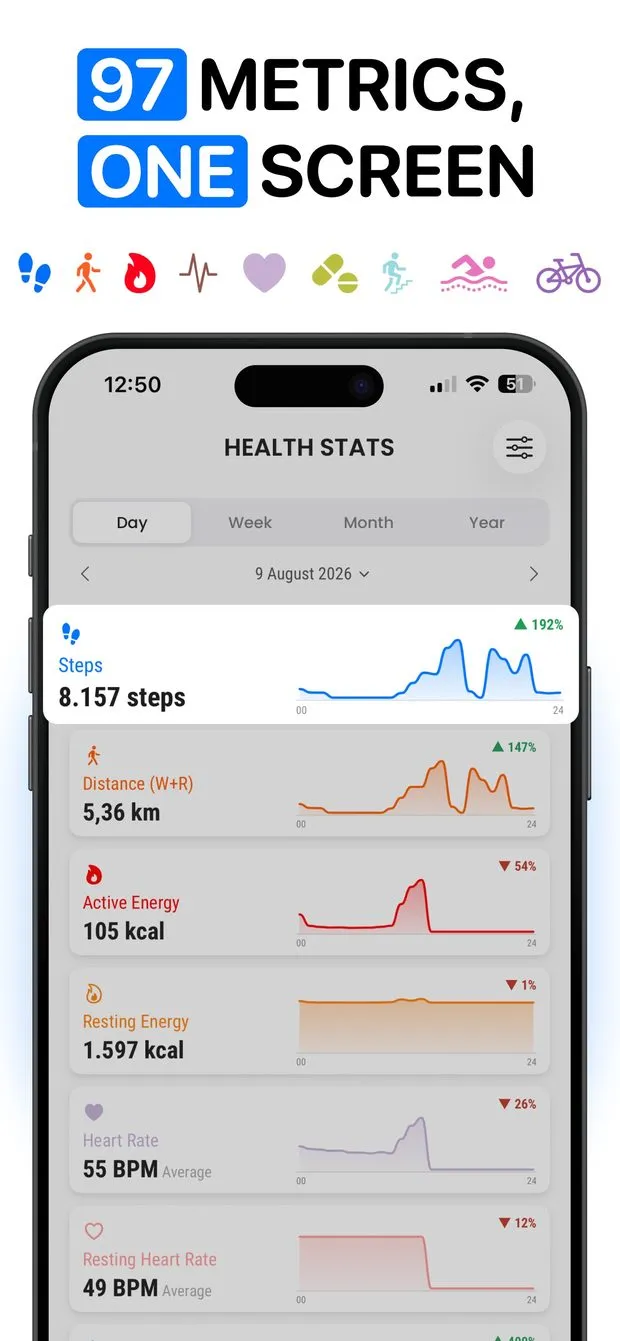
Heart rate readings recorded by an Apple Watch or another device land in the Health app, which charts them one range at a time. Health Stats reads that history and shows heart rate and resting heart rate as Day, Week, Month and Year charts you can step back through, with a comparison overlay against the previous period, a lowest-median-highest distribution, record values with their dates, and the source device for each reading. Heart rate metrics are part of Pro; steps, distance and active energy are the free set.
Where the readings come from
Health Stats does not measure anything. It reads what is already in Health: continuous and workout heart rate from an Apple Watch, resting heart rate as Health computes it, and readings written by other apps or devices you have connected. If the Health app has no heart rate data, neither will Health Stats.
What the heart rate view adds
Open Heart Rate or Resting Heart Rate from the dashboard. The chart follows the Day / Week / Month / Year switch and every earlier period is one swipe back. Compare draws last month under this month or last year under this year — see comparing periods. The distribution bar shows lowest, median and highest for the range; Insights list records such as the highest reading and when it happened; and the Sources panel answers which device recorded a given number, which matters when a Watch and a chest strap both write to Health.
Resting heart rate over a year
Resting heart rate is one value a day, so the Year view is where it becomes readable: twelve months on one chart, the previous year underneath when Compare is on. The Timeline tab lists the daily values in order if you want the numbers rather than the curve.

What this cannot do
- Heart rate, resting heart rate and HRV are Pro metrics. The free tier covers steps, walking + running distance and active energy.
- It shows readings; it does not say whether a heart rate is normal, high or low, and it is not a medical device.
- No live measurement, no alerts and no Apple Watch app; it is a viewer for data Health already holds.
- iPhone only, iOS 15 or later.
Questions people ask
How far back does heart rate history go?
As far back as your Health data does. Health Stats reads the full history Health holds for the metric, and the Timeline tab lists every reading in order.
Can I see heart rate from a workout only?
Health Stats charts the heart rate samples Health holds by period, not per workout. For a single workout's heart rate curve, the Fitness app remains the place to look.
Health Stats: Data & Charts
Charts, trends and records for 97 Apple Health metrics. Read-only, offline.