Pill Reminder • Meds Tracker app icon
Medical · Health & Fitness · Free

Pill Reminder: a pill reminder app for iPhone, no account needed

Set a dose time once, get alerted every day, tap Take or Skip. Data stays on your phone.

  • Free · In-app purchases
  • iPhone · iOS 15+
  • 15.9 MB
  • Age 4+
  • Updated September 2026
  • English

Screenshots

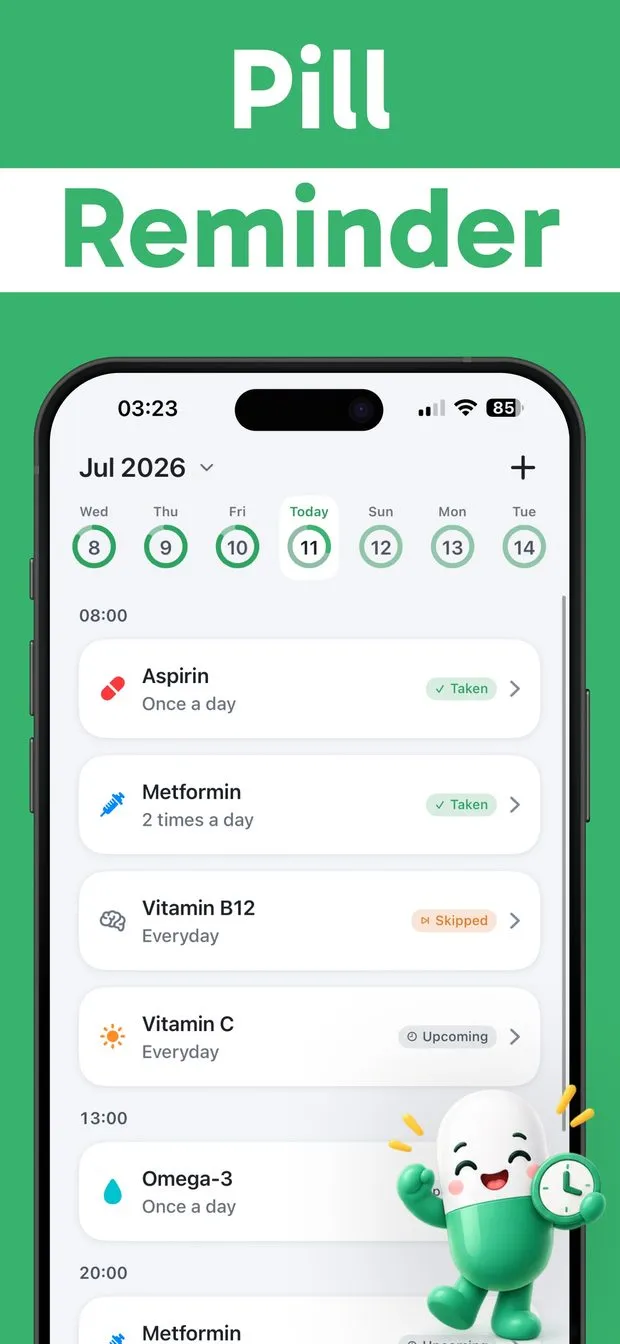
Pill Reminder home screen for July 2026 listing Aspirin, Metformin and vitamin doses by time with Taken and Skipped tags
Expanded Vitamin C dose card with Edit, Skip and Take buttons, showing one-tap logging from the today list
Edit Reminder screen, step 1 of 3: name field, icon picker and dosage form choice between Pill, Liquid and Injection
iPhone notification banner reading 'Time to take Vitamin C' over a dark wallpaper, with the app's capsule mascot asleep below
Month calendar for June and July 2026 with a progress ring on every day showing how many doses were logged
Medications list with six entries, each showing its icon, name and frequency, plus an Archived section
Today list in dark mode with a dose marked Missed in red alongside Taken, Skipped and Upcoming statuses

Pill Reminder at a glance

Developer
Burak Köse, independent
Platform
iPhone · iOS 15 or later
Core use case
Dose alerts, one-tap Take or Skip log and a progress calendar. No account.
Key differentiator
A notification for every dose
Account
None needed
Internet
Not stated in the listing
Your data
Stays on your iPhone
Pricing
Free download · optional in-app purchases
Version
1.0.6 · September 2026 · 15.9 MB
Download
App Store

Pill Reminder • Meds Tracker is a free pill reminder app for iPhone that sends a notification at the exact time of every dose and logs it as Taken or Skipped with one tap. It is built for people on daily prescriptions, vitamins or birth control who want a reminder without creating an account. Every medication gets its own schedule, icon and color, and a progress calendar fills in automatically.

A notification for every dose

Set the time once and the app sends a clear alert at that exact time, every day: morning, noon, evening, bedtime, or any combination you need.

Take or Skip in one tap

Log each dose straight from the notification or the home screen. The card shows Taken, Skipped, Missed or Upcoming, so you never wonder twice.

No account, data on your phone

Nothing to sign up for. Your medication list and dose history are stored on your iPhone; no cloud backup or multi-device sync is advertised.

A calendar that fills itself

Every logged dose lands on a progress calendar with a ring per day, so you can look back at any date and see what you took.

How to remember to take your pills every day on iPhone

The problem with a plain alarm is that it fires once and tells you nothing. Pill Reminder ties each alert to a specific medication, so the notification says which one is due, for example "Time to take Vitamin C", at the exact time you set. Each medication can have its own schedule: every day, only specific days of the week, or as needed. Multiple daily doses are supported too, so a pill taken twice a day gets a morning slot and an evening slot, each with its own Taken state.

The home screen groups today's doses by time (08:00, 13:00, 20:00 and so on) under a week strip with a progress ring per day. Add a medication once with the + button and the app does the remembering from then on, day and night. That simplicity is why it works as a medication reminder for seniors and for anyone setting one up for a parent.

  • Every day at one or more fixed times
  • Specific days of the week only
  • As needed, with no fixed schedule
  • Morning, noon, evening and bedtime slots on the same medication

Did I take my pill already? How the dose log answers it

Most missed-dose mistakes are really double-dose worries: you cannot remember whether you already took it. Pill Reminder answers that with a status on every dose card. Tap Take or Skip from the notification or from the home screen, and the card switches to Taken in green or Skipped in orange. A dose whose time has passed without a tap shows as Missed in red, and future doses show as Upcoming.

Because each dose takes one tap to log, the record tends to stay complete. When it is complete, the question "did I take my pill?" is answered by glancing at today's list rather than by trying to recall. Past days keep the same record on the calendar, so you can check yesterday just as easily.

Medication reminder app with no account and data kept on your iPhone

Some medication apps want an account before you can add a single pill. Pill Reminder has no account at all: install it, tap +, and you are done. Your medication names, schedules and dose history are stored on your device, which matters in a category where the data, which prescriptions you take and when, is about as personal as it gets.

The trade-off is worth stating plainly: no cloud backup or multi-device sync is advertised, so the data lives on the iPhone you installed it on. If you want a reminder that works out of the box without a sign-up form, that is the point.

Pill reminder app for iPhone with a calendar to track taken and missed doses

The progress calendar is the part that keeps the app useful after week one. Every day shows a ring that fills as doses are logged, both in the week strip at the top of the home screen and in the full month view. Scroll back through June, July and August and see at a glance which days were complete and which had gaps.

Because the calendar fills in automatically from your Take and Skip taps, there is nothing extra to maintain. The description lists a progress calendar among the app's core features and an advanced calendar under Premium; it does not say what the advanced version adds.

One reminder app for prescriptions, vitamins, supplements and birth control

Pill Reminder does not care whether the thing you are tracking is Metformin or Omega-3. When you add a medication you pick a dosage form, Pill (tablets or capsules), Liquid (syrups or solutions) or Injection (vials or pens), then give it an icon and a color so it is recognizable at a glance. The Medications screen lists everything you take with its frequency and keeps an Archived section for medications you no longer take. The whole app, including this list, has a light and a dark mode.

The description names four typical uses: daily prescriptions and long-term medications, vitamins and supplements, birth control reminders, and building a more consistent routine. A daily birth control pill, for instance, is just a medication scheduled every day at one fixed time.
How it works

How to set up a pill reminder on iPhone with Pill Reminder

  1. Add a medication

    Open Pill Reminder and tap the + button in the top-right corner of the home screen to add a reminder.

  2. Name it and pick the dosage form

    Type the medication name, tap the icon to choose an icon and color, then select Pill, Liquid or Injection.

  3. Set the schedule and dose times

    Set the schedule for the medication: every day, specific days of the week, or as needed, with one or more dose times (morning, noon, evening, bedtime).

  4. Log each dose from the alert

    When the notification arrives, tap Take or Skip from the notification or the home screen. The progress calendar updates automatically.

Made for

Who Pill Reminder is for

Daily prescriptions

One card per medication, one alert per dose. Twice-a-day meds get two time slots with separate Taken states.

Vitamins and supplements

Vitamin C, B12 and Omega-3 sit next to prescriptions with their own icons, so the morning routine is one list.

Birth control reminder

A daily pill at one fixed time, logged with a tap, with the calendar showing which days were covered.

Several meds, different days

Medications on different weekday schedules, color-coded so each is recognizable at a glance in the list.

Parents and older relatives

Set it up once on their iPhone; the daily list and one-tap Take or Skip need no explanation.

Pricing

What is free and what Premium adds

Free No account

  • Dose notifications at set times
  • One-tap Take or Skip logging
  • Daily, specific-weekday or as-needed schedules
  • Multiple dose times per day
  • Color-coded medication icons
  • Progress calendar, light and dark mode

Premium In-app purchase

  • Unlimited medications
  • Smart reminders
  • Advanced calendar
  • Ad-free, popup-free experience

Offered as an auto-renewing subscription or a one-time purchase where available. Prices are shown in the app and vary by region.

Information

Pill Reminder • Meds Tracker at a glance

Developer
Burak Köse
Category
Medical, Health & Fitness
Price
Free, with in-app purchases
Compatibility
iPhone · Requires iOS 15 or later
Size
15.9 MB
Languages
English
Age rating
4+
Version
1.0.6 · updated September 15, 2026
First released
July 13, 2026
App Store
Pill Reminder • Meds Tracker
Privacy policy
burakkose.me/privacy
Support
info.bk.apps@gmail.com
FAQ

Pill Reminder — frequently asked questions

Is Pill Reminder free on iPhone?

Yes. Pill Reminder • Meds Tracker is free to download from the App Store and includes dose reminders, one-tap Take or Skip logging, flexible schedules, color-coded medications, a progress calendar and light and dark mode. An optional Premium in-app purchase unlocks more, including unlimited medications.

Do I need an account to use this medication reminder app?

No. Pill Reminder has no sign-up step: you install it, tap +, and add your first medication. The description says your medication data is stored on your device; there is no account to create, and cloud sync is not advertised.

How do I know if I already took my pill today?

Open the app: today's doses are listed by time, and each one shows Taken, Skipped, Missed or Upcoming. Because you log a dose with one tap from the notification or the home screen, the status is already there when you wonder. The calendar keeps the same record for past days.

Can I use Pill Reminder as a birth control reminder?

Yes. The App Store description lists birth control reminders as one of the app's intended uses. Add the pill as a medication scheduled every day at the time you take it; you get a notification at that time and can tap Take to log it. The app is a reminder tool and gives no medical guidance.

Can it track vitamins and supplements as well as prescriptions?

Yes. Pills, capsules, liquids, vitamins and supplements all go in the same list, each with its own icon, color and schedule. When adding one you choose a dosage form: Pill (tablets or capsules), Liquid (syrups or solutions) or Injection (vials or pens). The Medications screen also keeps an Archived section for medications you no longer take.

What does Pill Reminder Premium include?

According to the App Store description, Premium unlocks unlimited medications, smart reminders, an advanced calendar and an ad-free, popup-free experience. The free version still includes reminders, one-tap logging and the progress calendar.

Does Pill Reminder work on iPad, Apple Watch or Android?

It is built for iPhone and requires iOS 15.0 or later, downloads at 15.9 MB and is offered in English. There is no iPad layout, and the App Store description does not mention an Apple Watch app or an Android version.

What happens if I skip or miss a dose?

If you tap Skip, the dose is marked Skipped in orange. If the scheduled time passes without a tap, the card shows Missed in red. Both states are recorded on the progress calendar so you can see gaps later. The app does not tell you what to do about a missed dose; ask a pharmacist or doctor.