Walkbook: Track My Walk & Hike app icon
Health & Fitness · Navigation · Free

Japanese walking app: 3 minutes brisk, 3 minutes easy, with GPS

A Japanese walking timer that calls every change, plus a GPS walk tracker.

  • Free · In-app purchases
  • iPhone · iOS 17+
  • 11.9 MB
  • Age 4+
  • Updated October 2026
  • English

Screenshots

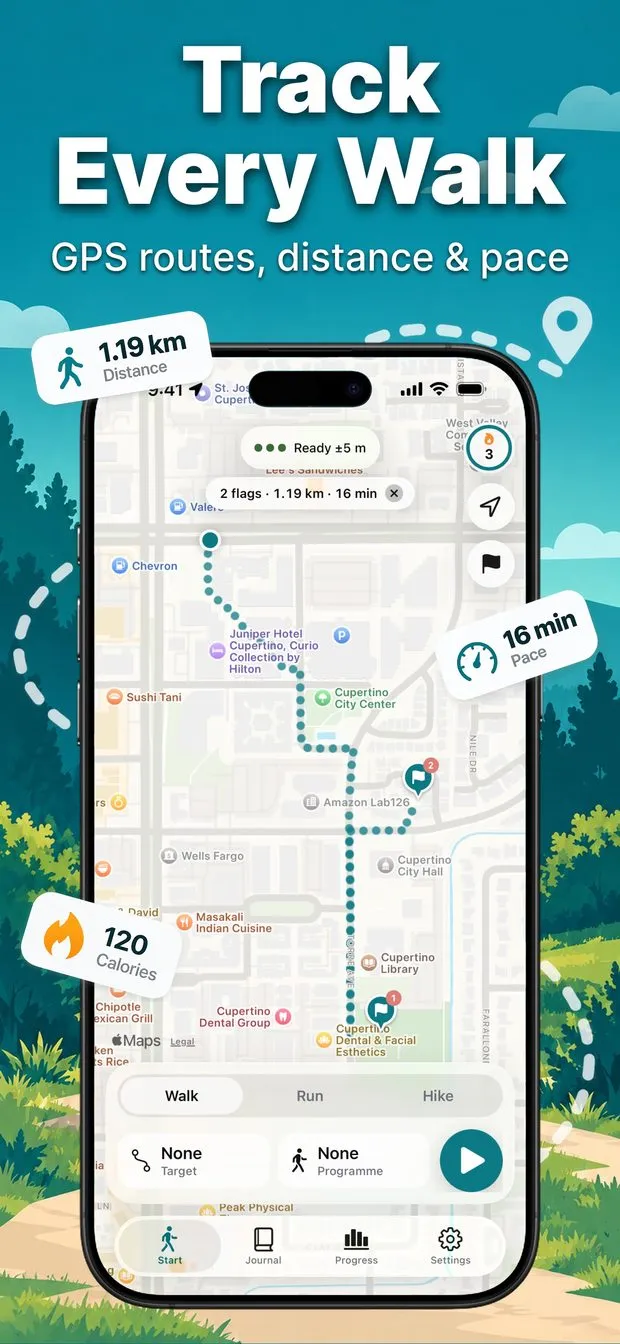
Start screen with a two-flag planned route of 1.19 km and 16 minutes on the map, Walk, Run and Hike tabs and a start button
Programme sheet with Japanese walking selected: 5 x 3 min brisk plus 3 min easy, 30 minutes total, beside other plan cards
Share sheet previewing an Evening walk route card with theme, background and size options, including Story, Post and Sticker
Live recording at 0.52 km on the map with a Brisk phase, round 2 of 5, countdown, and spoken-update bubbles around the phone
Journal tab listing walks and runs by month with a route thumbnail, distance, time and pace for each entry
Progress tab for the week showing 10.70 km, time, workouts, steps, energy and elevation gain, and a km-per-day bar chart

Walkbook at a glance

Developer
Burak Köse, independent
Platform
iPhone · iOS 17 or later
Core use case
Japanese walking timer (3 min brisk, 3 min easy) plus a GPS walk tracker.
Key differentiator
Japanese walking, called out
Account
None needed
Internet
Not stated in the listing
Your data
Stays on your iPhone
Pricing
Free download · optional in-app purchases
Version
1.0.2 · October 2026 · 11.9 MB
Download
App Store

Walkbook is an iPhone app that does two jobs. It is a Japanese walking timer, with interval programmes of 3 minutes brisk and 3 minutes easy that announce every change by voice, and a GPS walk and hike tracker that keeps a journal of every route. Recording and history are free and unlimited; the Japanese walking programme is premium, with your first session free.

Japanese walking, called out

5 rounds of 3 minutes brisk and 3 minutes easy, 30 minutes in total. Walkbook announces each change so the phone can stay in your pocket.

GPS walk, run and hike tracker

Press start and Walkbook draws your route with GPS, with the screen locked. Unlimited recording and full history are free.

Plan a route with flags

Touch and hold the map to drop flags. Walkbook draws a walking route and shows its distance and time before you start.

No account, no ads, private

No sign-up and no servers. Your walks stay on your iPhone, and Walkbook does not collect your location or health data.

What is Japanese walking, and how do you do it with an app?

Japanese walking is interval walking: you alternate about 3 minutes of brisk walking with about 3 minutes of easy walking, and repeat. The hard part is not the walking, it is watching the clock. A Japanese walking app handles the timing so you can pay attention to the walk instead.

In Walkbook the Japanese walking programme is 5 rounds of 3 minutes brisk plus 3 minutes easy, 30 minutes in total. Choose it in the Programme sheet, press start, and the app calls out every change by voice, so you do not need to look at the screen. The Japanese walking programme is part of Walkbook Premium, and your first programme session is free so you can try it before deciding.

Interval walking timer: 3 minutes fast, 3 minutes slow with spoken cues

During a programme the recording screen shows the current phase, for example Brisk, round 2 of 5, with a countdown and the next phase (Next: Easy) underneath, above the usual distance, moving time and pace. The voice coach speaks the changes, and a quiet chime mode keeps it out of the way if you are listening to a podcast.

The same Programme sheet also lists other plans, such as Brisk 20 and a Weight loss walk for walking, and Walk/Run, First run and Run 3:1 for running. The store listing states that Japanese walking and the walk-run interval programmes are Premium, and you can always pick No programme and simply record for free.

  • Japanese walking: 5 rounds of 3 min brisk and 3 min easy, 30 min total
  • Spoken change cues, so the screen can stay off
  • Quiet chime mode for podcasts
  • Live phase, round count and countdown on screen
  • Premium; first programme session free

How to track my walk on iPhone with GPS

Open Walkbook, choose Walk, Run or Hike, and press the start button. Put the phone in your pocket: Walkbook keeps recording with the screen locked and draws your route on the map with GPS. Distance is filtered for slow and stop-and-go walking, and there are big live numbers for distance, time, pace, steps, cadence, calories and elevation, plus splits for every kilometre or mile.

Recording is built so a saved walk is never lost. The walk is saved every few seconds, so if the app closes mid-walk you can resume, save or delete it next time. Auto-pause is included, the app notices when you get on a bus or into a car, and you hold to finish with a 10-second undo. A Live Activity appears on the Lock Screen and in the Dynamic Island, and you can start from Siri, Shortcuts or the Action Button.

Walking route planner: set flags and see distance and time first

Touch and hold the map to drop a flag and Walkbook draws a walking route to it. Add more flags for a longer walk and the planner shows the total distance and time before you start; the first screenshot shows a two-flag route of 1.19 km and 16 minutes. You can also set a time or distance target for any walk.

When you finish, the walk becomes a page in your journal with its route map, an automatic title such as Evening walk · Riverside, and its stats. Browse by All, Walk, Run or Hike, see monthly totals, pace and elevation charts, splits and personal records, and set a weekly goal in distance or time with your streak on the start screen.

Is the Japanese walking app free, and what does Premium add?

Walkbook is free to download and free to use for tracking: unlimited GPS recording including in the background, maps, every live metric, splits, the voice coach, your whole history with no time limit, and Apple Health, GPX and ZIP export. There is no account and no ads.

Japanese walking is the exception. Walkbook Premium adds the Japanese walking and walk-run interval programmes, pace insights, year and all-time progress with up to three goals, and more share-card themes. Your first programme session is free. Premium is available weekly, yearly or as a one-time lifetime purchase that does not renew.

  • Free: unlimited recording, full history, maps, splits, voice coach
  • Free: Apple Health saving, GPX and ZIP export, one weekly goal and streak
  • Premium: Japanese walking and walk-run interval programmes
  • Premium: pace insights, year and all-time progress, extra share themes
  • First programme session is free; weekly, yearly or lifetime options

How it works

How to do a Japanese walking session with Walkbook

  1. Open the Programme sheet

    On the Start screen choose Walk, then tap Programme and pick Japanese walking: 5 x 3 min brisk plus 3 min easy, 30 minutes in total.

  2. Press start

    Tap Use, then the start button. GPS recording begins and you can lock the screen and put the phone in your pocket.

  3. Follow the spoken cues

    Walkbook announces each switch between brisk and easy, so you never need to look at the screen to know when to change pace.

  4. Hold to finish and review

    When the programme ends, hold to finish. The walk is saved to your journal with its route map, pace and stats.

Made for

Who Walkbook is for

Trying interval walking

A timer that calls the 3 minute brisk and 3 minute easy changes, so you only have to walk.

Everyday walk logging

Press start, pocket the phone, and every walk lands in a journal with its map and numbers.

Hikes and longer routes

Hike mode with elevation, live route and splits, plus GPX export of any walk.

Planning a walk

Drop flags on the map and see the distance and time before you set off.

Podcast and music walks

Voice cues with a quiet chime mode, and a Live Activity on the Lock Screen.

Pricing

What is free and what Premium adds

Free No account

  • Unlimited GPS recording, including in the background
  • Your whole history, with no time limit
  • Maps, every live metric and splits
  • The voice coach and Lock Screen Live Activity
  • Apple Health saving, GPX and ZIP export
  • First programme session free; no account, no ads

Premium In-app purchase

  • Japanese walking and walk-run interval programmes
  • Pace insights: pace-coloured routes, cadence and split comparison
  • Year and all-time progress with up to three goals
  • More share-card themes
  • Weekly, yearly or one-time lifetime purchase

Offered as an auto-renewing subscription or a one-time purchase where available. Prices are shown in the app and vary by region.

Information

Walkbook: Track My Walk & Hike at a glance

Developer
Burak Köse
Category
Health & Fitness, Navigation
Price
Free, with in-app purchases
Compatibility
iPhone · Requires iOS 17 or later
Size
11.9 MB
Languages
English
Age rating
4+
Version
1.0.2 · updated October 12, 2026
First released
October 6, 2026
App Store
Walkbook: Track My Walk & Hike
Privacy policy
burakkose.me/privacy
Support
info.bk.apps@gmail.com
FAQ

Walkbook — frequently asked questions

What is Japanese walking?

Japanese walking is interval walking: you alternate roughly 3 minutes of brisk walking with 3 minutes of easy walking. Walkbook's Japanese walking programme is 5 rounds of 3 minutes brisk plus 3 minutes easy, 30 minutes in total, with a spoken call-out at every change.

Is there a Japanese walking app for iPhone with a built-in timer?

Yes. Walkbook is an iPhone app with a Japanese walking programme that times the 3 minute brisk and 3 minute easy intervals and announces each change by voice. It also records your route with GPS, so the walk is saved in a journal with its map and stats.

Is the Japanese walking programme free in Walkbook?

Your first programme session is free, so you can try Japanese walking before paying. After that, Japanese walking and walk-run interval programmes are part of Walkbook Premium. Recording, history, maps and the voice coach stay free and unlimited, with no account or ads.

How much does Walkbook Premium cost?

Prices vary by region and change over time, so check the App Store listing for the current figure. Premium is available weekly, yearly or as a one-time lifetime purchase that does not renew. Subscriptions renew automatically unless cancelled at least 24 hours before the period ends.

Does Walkbook keep tracking with the screen locked, and what if the app closes?

Yes. Walkbook keeps recording with the screen locked and the phone in your pocket, including in the background. The walk is saved every few seconds, so if the app closes mid-walk you can resume, save or delete it the next time you open it.

Can I plan a walking route before I start?

Yes. Touch and hold the map to drop a flag and Walkbook draws a walking route there. Add more flags for a longer walk and the distance and time are shown before you start. You can also set a time or distance target for any walk.

Can I export my walks or save them to Apple Health?

Yes, and both are free. Walkbook saves a walk to Apple Health with its route, exports one walk as GPX, or exports every walk at once as a ZIP. Shared route cards hide the start and end of the route by default.

Does Walkbook need an account, and does it work on iPad or Android?

No account or sign-up is needed, and Walkbook does not collect your location or health data; walks stay on your iPhone. It is an iPhone app requiring iOS 17 or later, with no iPad or Android version, a 11.9 MB download, in English.