Screenshot Organizer - Sweepy app icon
Utilities · Productivity · Free

Screenshot organizer app for iPhone: swipe left to delete, right to keep

Sort screenshots in rounds of 25 or 50. Nothing is deleted until you tap Apply.

  • Free · In-app purchases
  • iPhone · iOS 15+
  • 9.9 MB
  • Age 4+
  • Updated September 2026
  • 5 languages

Screenshots

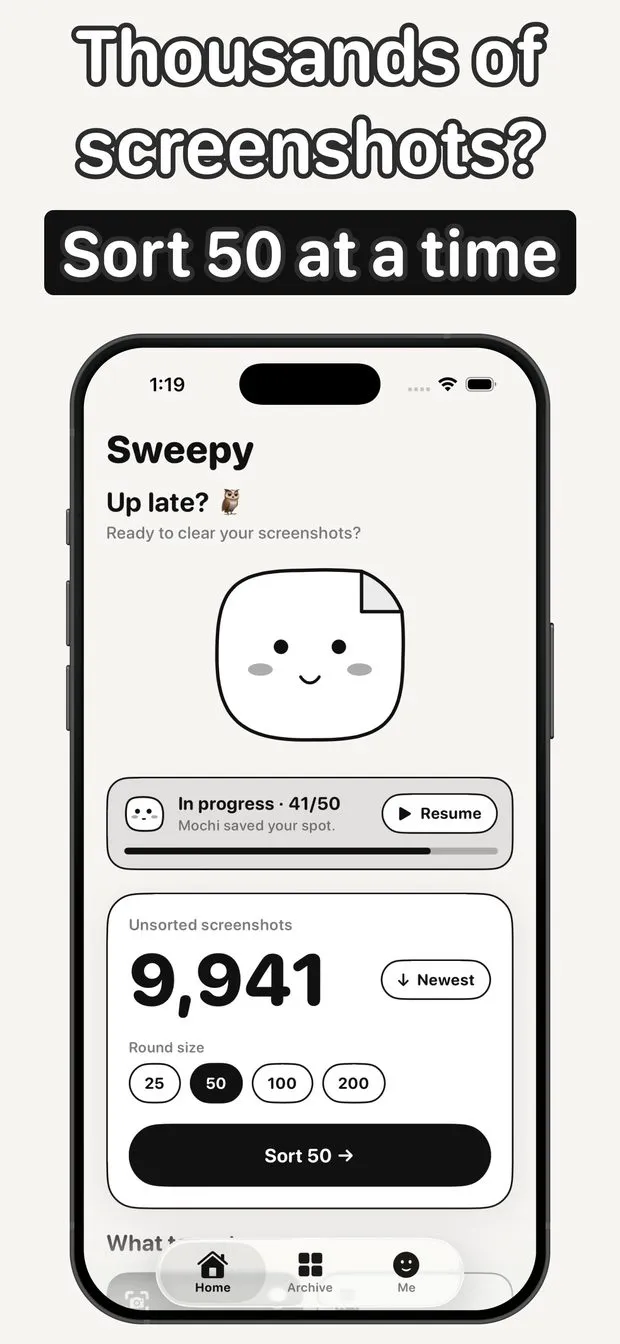
Sweepy home screen with 9,941 unsorted screenshots, round sizes 25, 50, 100 and 200, and a round in progress at 41 of 50
Sorting card being swiped right to Keep, with Delete, Later and Keep buttons and folder chips below
Round complete summary: 19 deleted, 31 kept, a review list of the round and an Apply Delete 19 button
Me tab stats showing 1,284 screenshots sorted, 731 deleted, 2.34 GB freed and a best streak of 19 days
What to sort sheet with Screenshots and All photos options over a camera roll of 9,922 unsorted photos
The home screen shown in several of the six colour themes, with Mochi's faces in different moods
Screenshot detail with Keep and Later buttons, a note field, tags, expiry reminder toggle, Copy all text and Share
Archive tab with All kept and Later counts and folders for Shopping, Receipts, Chats and Recipes

Sweepy at a glance

Developer
Burak Köse, independent
Platform
iPhone · iOS 15 or later
Core use case
Swipe left to delete, right to keep: clear thousands of screenshots, no ads.
Key differentiator
One swipe per screenshot
Account
Not stated in the listing
Internet
Not stated in the listing
Your data
See the privacy policy
Pricing
Free download · optional in-app purchases
Version
1.0.1 · September 2026 · 9.9 MB
Download
App Store

Sweepy is a screenshot organizer app for iPhone that turns cleanup into short rounds: one screenshot at a time, swipe left to delete, right to keep, up to file it into a folder. Folders are real Photos albums, nothing is deleted until you tap Apply, and everything happens on the phone. It has no ads, including in the free version.

One swipe per screenshot

Left to delete, right to keep, up to file into a folder. Rounds of 25 or 50, and Mochi saves your spot when you stop.

Nothing deleted until Apply

Review the round, undo any decision, then tap Apply; iOS asks once to confirm the deletion.

Folders are Photos albums

Filed screenshots stay in the Photos app, in albums you can open there, not locked inside Sweepy.

No ads, on device

No ads, even in the free version. Screenshots are never uploaded or analyzed on a server.

How to delete screenshots on iPhone fast without losing the ones you need

Photos can select every screenshot and delete them in one go, which works if you want all of them gone. Most people do not: a boarding pass, a receipt and a recipe are buried among the memes. Sweepy shows one screenshot at a time and asks for one swipe each: left to delete, right to keep, up to file it into a folder. Rounds are 25 or 50, so a pile of thousands becomes a few minutes a day.

Nothing is removed while you swipe. At the end of a round you review the decisions, undo any of them, and tap Apply; iOS then asks once to confirm. Progress is saved after every swipe, so a call or a dead battery mid-round loses nothing. The app is built to stay fast with 10,000+ screenshots.

How to organize screenshots on iPhone into albums

Swipe up to file a screenshot into a folder. Folders are real Photos albums, so the screenshots stay in Photos, where you would look for them anyway. Sweepy suggests a folder for common types such as receipts, recipes, chats, places and shopping, and you confirm before anything is filed.

The Archive tab lists everything you kept, a Later pile for decisions you want to put off, and your folders. The free version includes 8 folders; Pro makes them unlimited. Because they are ordinary albums, they behave like any other album, including in iCloud Photos if you use it.

Search text inside screenshots, add notes and tags

Sweepy searches the text inside your screenshots in Korean, English, Japanese and Chinese, so a screenshot of an address or an order number can be found by what it says. Live Text lets you copy a code, an address or a phone number straight from the image, and any screenshot can carry a note and tags.

For tickets and coupons, Pro adds expiry reminders that nudge you before the date passes, so a screenshot you kept for later does not go stale unnoticed. The free version already includes search, notes and tags.

Screenshot cleaner app with no ads that stays on your iPhone

Cleanup apps often fill the free version with ads. Sweepy has none, in the free or the paid version. Everything happens on the iPhone: screenshots are never uploaded, analyzed on a server or seen by anyone, and nothing is deleted without your OK.

A Me tab tracks shots sorted, space freed and your daily streak, and Mochi, the sorting buddy, reacts to each swipe. Six themes are included, two of them free: Paper, Cream, Sage, Terracotta, Mocha and Midnight. None of it is required: the sorting works the same with stats ignored.

Is Sweepy free, and what does Pro add?

Free covers the full sorting experience: rounds of 25 and 50, 8 folders, search, notes and two themes. Pro adds unlimited folders, rounds of 100 and 200, sorting the whole camera roll rather than only screenshots, all six themes and expiry reminders for tickets and coupons. Pro is a weekly or yearly subscription or a one-time lifetime purchase.

Sweepy runs on iPhone with iOS 15 or later, is a 9.9 MB download, and its interface is in English, Japanese, Korean, Chinese and Turkish.

How it works

How to clean up iPhone screenshots with Sweepy

  1. Start a round

    Pick 25 or 50 screenshots per round and tap Sort.

  2. Swipe each screenshot

    Left to delete, right to keep, up to file it into a folder. Undo is always one tap away.

  3. Review and apply

    Check the round's decisions, then tap Apply; iOS asks once before deleting.

  4. Find them later

    Open Archive for kept screenshots and folders, or search the text inside them.

Made for

Who Sweepy is for

A camera roll full of shots

Thousands of screenshots, cleared 50 at a time with one swipe each and no marathon session.

Receipts and orders

File receipts into a Photos album and find an order number later by searching its text.

Tickets and coupons

Keep the boarding pass, add a note, and with Pro get a reminder before it expires.

Recipes and places

Folder suggestions sort recipes, places and shopping; you confirm each one.

Low storage warnings

Delete the screenshots you no longer need and watch the space freed in your stats.

Pricing

What is free and what Premium adds

Free No time limit

  • Full swipe sorting with undo and Apply
  • Rounds of 25 and 50
  • 8 folders as Photos albums
  • Text search, notes and tags
  • Two themes, no ads

Premium In-app purchase

  • Unlimited folders
  • Rounds of 100 and 200
  • Sort the whole camera roll
  • All six themes
  • Expiry reminders for tickets and coupons

Offered as an auto-renewing subscription or a one-time purchase where available. Prices are shown in the app and vary by region.

Information

Screenshot Organizer - Sweepy at a glance

Developer
Burak Köse
Category
Utilities, Productivity
Price
Free, with in-app purchases
Compatibility
iPhone · Requires iOS 15 or later
Size
9.9 MB
Languages
English, JA, KO, Chinese, Turkish
Age rating
4+
Version
1.0.1 · updated September 26, 2026
First released
September 22, 2026
App Store
Screenshot Organizer - Sweepy
Privacy policy
burakkose.me/privacy
Support
info.bk.apps@gmail.com
FAQ

Sweepy — frequently asked questions

Is Sweepy free?

Yes. The free version includes the full sorting experience: rounds of 25 and 50, 8 folders, search, notes and two themes, with no ads. Pro adds unlimited folders, larger rounds, whole camera roll sorting, all six themes and expiry reminders.

Does Sweepy delete screenshots right away?

No. Nothing is deleted while you swipe. At the end of a round you can undo any decision, and screenshots are only deleted when you tap Apply and confirm the iOS prompt.

Are my screenshots uploaded anywhere?

No. Everything happens on your iPhone. Screenshots are never uploaded, analyzed on a server or seen by anyone, according to the App Store listing. Nothing is deleted without your OK.

Where do the folders go?

Folders are real albums in the Photos app, so filed screenshots stay in Photos and are visible there even without opening Sweepy. They are ordinary albums, so they remain in Photos if you ever remove the app.

Which languages can Sweepy search inside screenshots?

Text search inside screenshots works in Korean, English, Japanese and Chinese. The app interface is available in English, Japanese, Korean, Chinese and Turkish. Search runs on the phone.

Can Sweepy clean up regular photos too?

Yes, with Pro. The free version sorts screenshots; Pro adds sorting your whole camera roll, plus rounds of 100 and 200. Deleting still waits for Apply.

What happens if I stop in the middle of a round?

Your progress is saved after every swipe. Stop whenever you like and pick up from the same spot later, even after a call, a crash or a dead battery.

Does Sweepy work on iPad?

The App Store listing is for iPhone and requires iOS 15 or later; there is no iPad or Android version. The interface is in English, Japanese, Korean, Chinese and Turkish.