Project Gutenberg eBook Reader app icon
Books · Reference · Free

Project Gutenberg App for iPhone and iPad: 75,000+ Free Classic Books

75,000+ public-domain classics for offline reading, with read-along audiobooks.

  • Free · In-app purchases
  • iPhone and iPad · iOS 16+
  • 25.5 MB
  • Age 4+
  • Updated September 2026
  • English

Screenshots

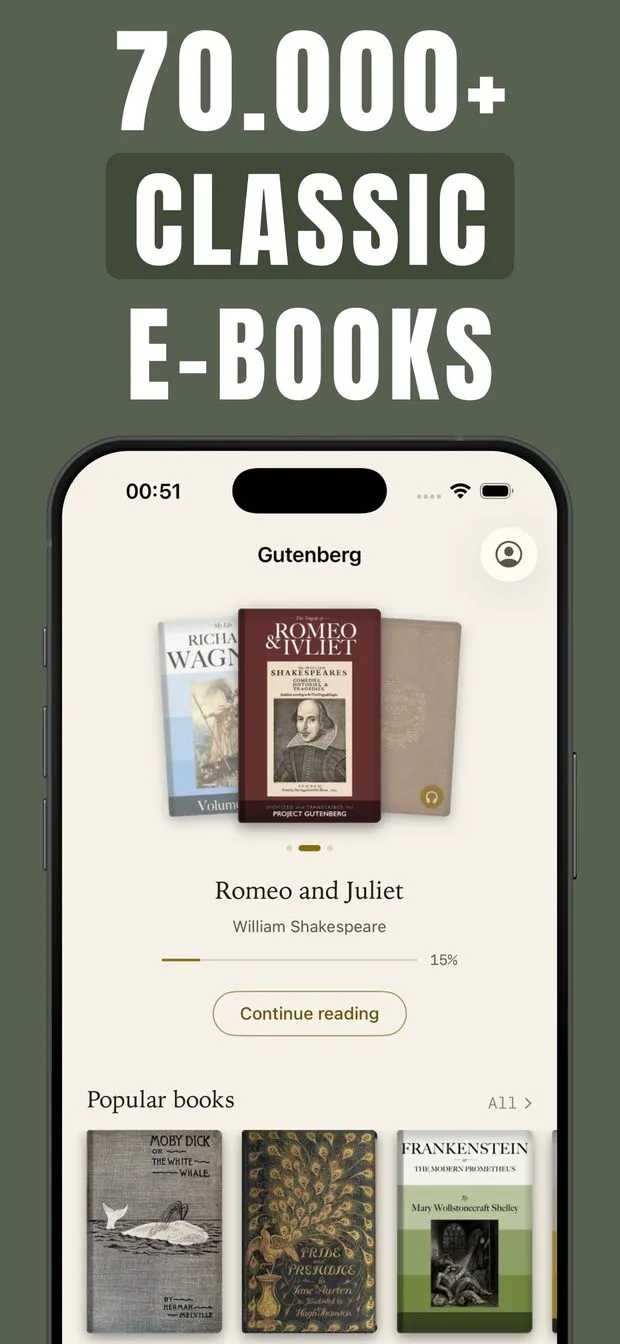
Gutenberg home screen with Romeo and Juliet at 15% progress, a Continue reading button and a Popular books row
Book detail page for Romeo and Juliet showing category, download count, reading-ease score, summary and subject tags
Listen tab: a grid of read-along audiobooks with headphone badges and progress counters, including Moby-Dick and Middlemarch
Reader playing A Christmas Carol read-along with the current word highlighted and 1x speed, 15-second skip and pause controls
Search results for 'tolstoy' listing 82 books and 1 author, each with a download count and reading-ease score
Reader in light and dark themes, with the four-color highlight picker open on a selected word in The City of God
Explore tab with an All books row, Browse by subject cards for Literature and Science, and a Simultaneous books shelf

Gutenberg at a glance

Developer
Burak Köse, independent
Platform
iPhone and iPad · iOS 16 or later
Core use case
75,000+ free Project Gutenberg classics, offline, with read-along audiobooks.
Key differentiator
75,000+ public-domain books
Account
None needed
Internet
Offline once a book is downloaded
Your data
See the privacy policy
Pricing
Free download · optional in-app purchases
Version
1.0.10 · September 2026 · 25.5 MB
Download
App Store

Project Gutenberg eBook Reader is a free Project Gutenberg app for iPhone and iPad that puts more than 75,000 public-domain books into a clean, paper-like reader. It is for people who want the classics without accounts or EPUB file juggling. What sets it apart from other public-domain readers: read-along audiobooks where the narrated words light up on the page as you listen.

75,000+ public-domain books

75,000+ complete books from Project Gutenberg: fiction, history, philosophy, poetry and drama, searchable by title or author and browsable by subject.

Read-along audiobooks synced to the page

A growing collection of narrated classics. Words highlight as they are read, with background playback, lock-screen controls and adjustable speed.

Every book downloads for offline reading

Books are stored on your device, so they open on a plane or the subway. The app is offline-first and resumes exactly where you stopped.

No account, paper-like reader

Open the app and start reading. Page-curl or vertical scroll, light, sepia and dark themes, and adjustable typeface, text size and margins.

Project Gutenberg app for iPhone and iPad: 75,000+ complete public-domain books

Project Gutenberg eBook Reader is a free app for iPhone and iPad that carries more than 75,000 complete public-domain books from Project Gutenberg, covering fiction, history, philosophy, poetry, drama and more. Nothing is abridged and nothing is a sample. These are the whole texts, and every one of them is in the public domain, so the texts themselves, whether Shakespeare, Dickens, Austen or Tolstoy, cost nothing (the free version has ads and limits on opening books; Premium pays for the app, not the texts).

The Explore tab groups the library by subject. The Literature shelf alone lists 39,925 books and Science & Technology 3,592, with dozens more subjects such as History and Poetry behind them. Each book page shows its category, how many times it has been downloaded, a reading-ease score, a short summary and subject tags, so you can judge a title before opening it. The app is an independent reader built on Project Gutenberg's public files; it is not affiliated with the Project Gutenberg Literary Archive Foundation.

How to read Project Gutenberg books offline on iPhone without juggling EPUB files

The usual way to get a Gutenberg book onto an iPhone is to visit the mobile site, download an EPUB, then open it in Apple Books or another reader. This app removes those steps. Search or browse, tap a title, and the book downloads to your device. Every book in the catalog can be stored for offline reading, so it opens on a flight, on the subway or anywhere without Wi-Fi.

The reader itself is typeset to feel like paper. You choose a real page-curl turn or smooth vertical scrolling, pick light, sepia or dark, and adjust the typeface, text size and margins. Highlights come in four colors, you can keep bookmarks, and the full table of contents lets you jump to any chapter. Close the app mid-chapter and it reopens where you stopped.

  • Page-curl turn or vertical scrolling
  • Light, sepia and dark reading themes
  • Adjustable typeface, text size and margins
  • Highlights in four colors, plus bookmarks
  • Full table of contents to jump between chapters
  • Resumes where you left off

Read-along audiobook app that highlights words as the narrator reads

A growing set of classics in the app come as read-along audiobooks: a narrator reads the text while the words highlight on the page in sync, so you can read and listen at the same time or close your eyes and just listen. In the Listen tab each title shows a progress counter (Moby-Dick shows 0 / 138, Middlemarch 0 / 86) and the same book can be opened as text or as audio.

Playback keeps going in the background and on the lock screen, speed is adjustable, and skip-back and skip-forward buttons make it easy to replay a sentence. Whether you were reading or listening, the app resumes from the same spot. One honest limit: audio exists for a growing collection of titles, not for all 75,000 books, so most of the library is text-only for now. For a free public domain audiobooks app on iPhone that keeps the text in view, this is the core feature.

Free classic books app with no account: what is free and what Premium unlocks

There is no account and no sign-up: install the app and open a book. The free version includes catalog search, offline downloads and read-along audiobooks, but it shows ads and places limits on opening books and audiobooks.

Gutenberg Premium removes the ads and lifts all limits, so every book and every audiobook opens without interruption. It is sold as a Weekly or Yearly auto-renewable subscription or as a one-time Lifetime unlock; prices are shown inside the app and may vary by region. Subscriptions renew automatically unless auto-renew is turned off at least 24 hours before the current period ends, and you can manage or cancel them in your App Store account settings. The books themselves stay public domain either way: Premium pays for the app, not the texts.

How to find a specific author or subject among 75,000 free classics

Search covers all 75,000+ titles by book or by author and returns results in an instant. Typing "tolstoy", for example, splits results into 82 books and 1 author, and each row shows the download count and reading-ease score so you can pick the most-read edition or the easiest one first.

Beyond search, the Explore tab offers curated shelves, popular authors and picks based on what you are reading, and lists can be sorted by most downloaded, recently added, title or reading ease. Sorting classic books by reading ease is useful for English learners and for anyone who wants an accessible entry point into an author's work before tackling the harder novels. Set the app to Light, Dark or follow your system, and the reader matches.
Made for

Who Gutenberg is for

Commuting without signal

Download a novel once, then read on the subway or a flight. Every book in the app is available offline.

Reading the classics by ear

Put on a read-along audiobook and follow the highlighted words, or lock the phone and keep listening.

Students and book clubs

Search by author, jump chapters from the table of contents, highlight passages and keep bookmarks for class.

English learners

Read and listen at the same time, and sort by reading ease to find classics with simpler language first.

Bedtime reading

Switch to the dark or sepia theme, enlarge the text, and turn pages with a curl or a scroll, whichever suits you.

Pricing

What is free and what Premium adds

Free No account

  • Download and read with no account or sign-up
  • Search and browse the full 75,000+ book catalog
  • Download books for offline reading
  • Read-along audiobooks with synced highlighting, within free limits
  • Ads are shown and there are limits on opening books and audiobooks

Premium In-app purchase

  • Removes all ads
  • Lifts all limits: open every book and every audiobook without interruption
  • Offered as a Weekly or Yearly auto-renewable subscription
  • Or a one-time Lifetime unlock
  • Prices are shown in the app and may vary by region

Offered as an auto-renewing subscription or a one-time purchase where available. Prices are shown in the app and vary by region.

Information

Project Gutenberg eBook Reader at a glance

Developer
Burak Köse
Category
Books, Reference
Price
Free, with in-app purchases
Compatibility
iPhone and iPad · Requires iOS 16 or later
Size
25.5 MB
Languages
English
Age rating
4+
Version
1.0.10 · updated September 29, 2026
First released
August 17, 2026
App Store
Project Gutenberg eBook Reader
Privacy policy
burakkose.me/privacy
Support
info.bk.apps@gmail.com
FAQ

Gutenberg — frequently asked questions

Is the Project Gutenberg eBook Reader app free?

Yes. Project Gutenberg eBook Reader is free to download on iPhone and iPad and needs no account. The free version shows ads and places limits on opening books and audiobooks. Gutenberg Premium removes ads and lifts all limits; it is offered as a Weekly or Yearly subscription or a one-time Lifetime unlock, with prices shown in the app.

Does the Gutenberg app work offline?

Yes. Every one of the 75,000+ books can be downloaded to your iPhone or iPad for offline reading, and the app is built offline-first. Once a book is stored you can read it on a plane, on the subway or without Wi-Fi, and the app resumes at the exact spot where you stopped reading or listening.

Can I read and listen to a book at the same time?

Yes, for titles in the read-along collection. A narrator reads the classic aloud while each word highlights on the page in sync, so you can follow the text or just listen. Playback works in the background with lock-screen controls, adjustable speed and skip buttons. Audio is available for a growing set of titles, not for every book.

How many books are in the Gutenberg app?

The app gives access to more than 75,000 complete books from Project Gutenberg, spanning fiction, history, philosophy, poetry, drama and more. Browsing by subject, the Literature shelf alone lists 39,925 titles. All books are public domain, and you can search the full catalog by book title or author name.

Is this app affiliated with Project Gutenberg?

No. Project Gutenberg eBook Reader is an independent app and is not affiliated with the Project Gutenberg Literary Archive Foundation. All books in the app are sourced from Project Gutenberg and are in the public domain; the app adds the reader, offline downloads, search, subject browsing and read-along audiobooks on top of those free texts.

Do I need an account or sign-up to read?

No. There is no account, no sign-up and no login. Install Project Gutenberg eBook Reader on your iPhone or iPad, open it, and start reading or listening. The only optional purchase is Gutenberg Premium, which is handled through your Apple ID and removes ads and lifts the limits on opening books and audiobooks.

Does it work on iPad, and which iOS version is required?

Yes, the app runs on both iPhone and iPad. It requires iOS 16.0 or later and downloads at 25.5 MB. The interface is in English, and the app is available for iPhone and iPad only, with no Android or web version.

Can I change fonts, themes and page turning in the reader?

Yes. The reader offers light, sepia and dark themes and lets you adjust the typeface, text size and margins. You can turn pages with a real page-curl animation or switch to smooth vertical scrolling. The app itself can follow your system Light or Dark setting, and highlights come in four colors.