Dual Camera: Front Back PiP app icon
Photo & Video · Lifestyle · Free

Dual Camera app for iPhone: record front and back at the same time

Both cameras in one picture-in-picture file. One take, saved as 16:9 and 9:16. Free.

  • Free · In-app purchases
  • iPhone · iOS 16+
  • 15.5 MB
  • Age 4+
  • Updated September 2026
  • 2 languages

Screenshots

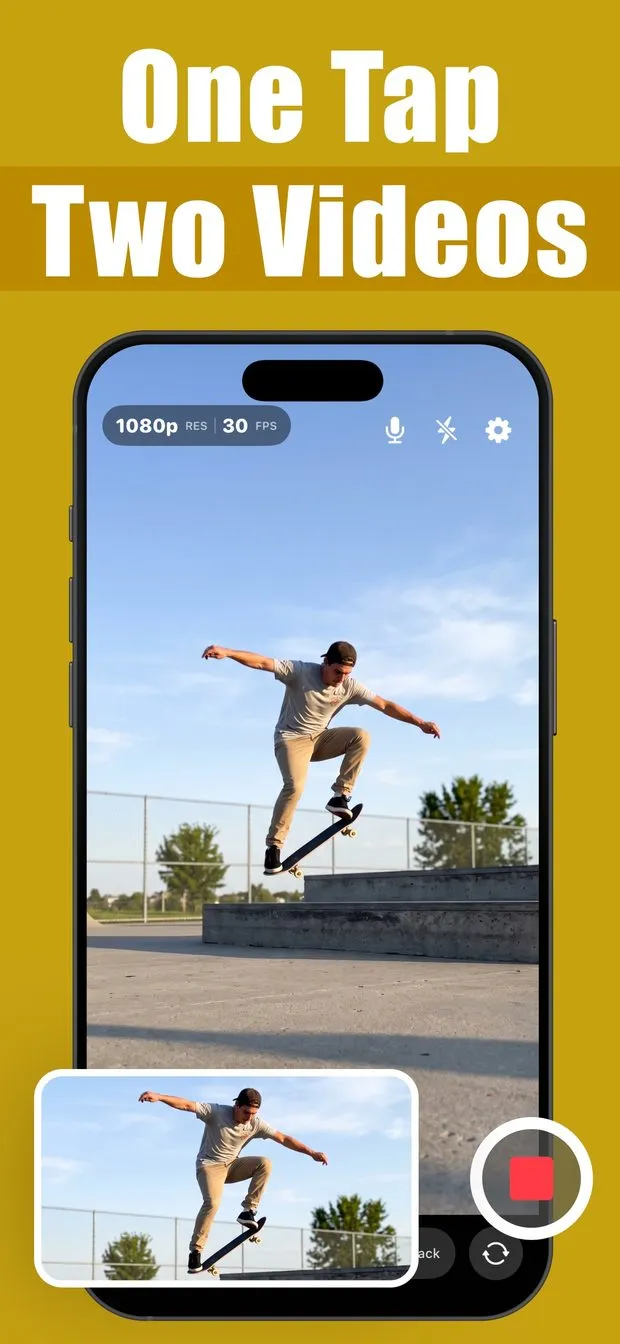
Dual Camera recording a skateboarder at 1080p 30 fps, with a landscape preview of the same shot in a bottom-left inset
Front/Back mode: the back camera films a cathedral street while the front-camera selfie sits in a picture-in-picture inset
Single mode with the on-screen 16:9 crop guide marking which part of the vertical frame the wide file will keep

Dual Camera at a glance

Developer
Burak Köse, independent
Platform
iPhone · iOS 16 or later
Core use case
Front and back camera in one PiP video, one take saved as 16:9 and 9:16.
Key differentiator
Both cameras, one file
Account
None needed
Internet
Not stated in the listing
Your data
See the privacy policy
Pricing
Free download · optional in-app purchases
Version
1.0.8 · September 2026 · 15.5 MB
Download
App Store

The Dual Camera app for iPhone is free and records the front and back camera at the same time, writing both feeds into one picture-in-picture video. It is built for reactions, vlogs, interviews and travel clips where the scene and your face belong in one file. The quieter trick: one take is saved twice, as a wide 16:9 for YouTube and a tall 9:16 for Reels, Shorts and TikTok.

Both cameras, one file

Front and back run at the same time and are written into a single picture-in-picture video. No overlaying, no syncing, no editing app.

One take, saved as 16:9 and 9:16

A recording is kept twice: a wide file for YouTube and a tall file for Reels, Shorts and TikTok. A live guide shows what the wide file keeps.

Drag the inset while recording

Move the small window anywhere on screen mid-take and the saved video follows. Tap it before you start to swap which camera leads.

Free with no time limit

1080p at 30 fps, photos and every framing tool, with no account or sign-up. Free clips carry a small corner watermark; premium removes it.

How to record front and back camera at the same time on iPhone

Open Dual Camera and pick Front/Back from the mode switch at the bottom of the screen. The back camera fills the viewfinder and the front camera sits in a small picture-in-picture inset, so you see the scene and yourself before you press record. If you would rather lead with your face, tap the inset first and the two feeds swap places.

Hit the red record button and both cameras run at once. There is no second pass and no editing app: the app writes one picture-in-picture file and saves it straight to your Photo Library. The free tier records at 1080p and 30 fps with no time limit, and you never create an account.

How to record 16:9 and 9:16 video at the same time on iPhone

Most people shoot vertical for Reels, Shorts and TikTok, then re-crop or re-shoot for YouTube. Dual Camera saves one take twice from the same moment: a wide 16:9 file and a tall 9:16 file. While you record, an on-screen guide marks exactly what the wide file will keep, so you can frame the subject inside it instead of guessing later.

Single mode is the one built for this: one lens, saved in two shapes. Dual mode records two rear lenses together, and Front/Back records both sides at once. The 16:9 plus 9:16 dual format is part of the free tier, so there is no re-cropping and no second take.

Does the dual camera app work on iPhone 16 or older?

Dual capture on an iPhone 16 or older: the App Store listing requires iOS 16.0 or later and publishes no per-model compatibility list, so check the App Store page for your model before relying on it. On a compatible phone, pick Front/Back mode and tap record; both cameras run at once.

Honest limits: it is an iPhone app, with no iPad or Android version, and the interface is available in English and Portuguese. The download is 15.5 MB. The free version shows ads and adds a small corner watermark to videos; premium removes both.

How content creators film reaction videos, vlogs and interviews with one iPhone

Reactions: your face and the thing you are reacting to land in one file, so there is nothing to sync or overlay afterward, which is why creators on TikTok, Reels and YouTube Shorts use a dual camera app instead of an editor. Vlogs: point the back camera at the road ahead while the front camera keeps you in frame as you talk about it. Interviews and podcasts: a two-camera setup from one phone, with zero extra gear.

Concerts, travel and sports work the same way: show the moment and the person living it. Mid-take, drag the inset anywhere on screen and the saved video follows it, so you can move your face out of the way of the action. Grid, crop guide and front-camera mirroring are included free, and the same two cameras can also capture a photo as one stitched picture.

Is the Dual Camera app free on iPhone, and what does premium add?

Yes. Both cameras at once, the 16:9 plus 9:16 dual format, 1080p at 30 fps, the Wide picture-in-picture layout, photos and every framing tool are free, with no time limit, no account and no sign-up. Free videos carry a small watermark in the corner and the free version shows ads.

Premium removes the watermark and the ads, unlocks 4K and 60 fps recording, and adds the other four layouts: Large, Circle, Split Top and Split Bottom. It is sold as a weekly or yearly subscription, or as a one-time lifetime purchase that does not renew.

  • Free: front and back at once, 1080p 30 fps, Wide layout, photos, grid, crop guide, mirroring
  • Free: no time limit, no account, no sign-up
  • Premium: no watermark, no ads, 4K and 60 fps
  • Premium: Large, Circle, Split Top and Split Bottom layouts (Wide is free)
  • Premium: weekly, yearly, or one-time lifetime purchase
How it works

How to record front and back camera at the same time with Dual Camera

  1. Pick a mode

    Choose Front/Back for both sides at once, Dual for two rear lenses, or Single for one lens saved in two shapes (16:9 and 9:16).

  2. Hit record

    Tap the red record button. Drag the picture-in-picture inset wherever you want it while recording; tap it before you start to swap which camera leads.

  3. Save to your Photo Library

    Stop recording and the video is saved straight to your Photo Library, ready to share to YouTube, Reels, Shorts or TikTok.

Made for

Who Dual Camera is for

Creators and reactions

Your face and what you are reacting to in one file, ready for TikTok, Reels or Shorts with no editing app.

Vlogs on the move

The road ahead from the back camera and you talking about it from the front, at the same time.

Interviews and podcasts

A two-camera setup from one phone: the guest on the back camera, you on the front. Zero extra gear.

Concerts, travel and sports

Show the moment and the person living it in one file, with nothing to sync or overlay afterward.

Pricing

What is free and what Premium adds

Free No account

  • Front and back cameras recorded at once
  • 16:9 plus 9:16 dual format from one take
  • 1080p at 30 fps with no time limit
  • Wide picture-in-picture layout
  • Dual-camera photos, grid, crop guide and front mirroring
  • No account or sign-up (free videos carry a small corner watermark)

Premium In-app purchase

  • No watermark
  • 4K and 60 fps recording
  • Large, Circle, Split Top and Split Bottom layouts (Wide included free)
  • No ads
  • Weekly, yearly, or one-time lifetime purchase
Offered as an auto-renewing subscription or a one-time purchase where available. Prices are shown in the app and vary by region.

Information

Dual Camera: Front Back PiP at a glance

Developer
Burak Köse
Category
Photo & Video, Lifestyle
Price
Free, with in-app purchases
Compatibility
iPhone · Requires iOS 16 or later
Size
15.5 MB
Languages
English, Portuguese
Age rating
4+
Version
1.0.8 · updated September 28, 2026
First released
September 1, 2026
App Store
Dual Camera: Front Back PiP
Privacy policy
burakkose.me/privacy
Support
info.bk.apps@gmail.com
FAQ

Dual Camera — frequently asked questions

Can you record with the front and back camera at the same time on iPhone?

Yes. Dual Camera runs the front and back cameras at once and writes them into a single picture-in-picture video, so the scene and your reaction are captured in one file. Pick Front/Back mode, tap record, and the finished clip is saved directly to your Photo Library. It needs iOS 16.0 or later.

Is there a free dual camera app for iPhone with no time limit?

Dual Camera is free to use with no recording time limit, no account and no sign-up. That tier includes both cameras at once, 1080p at 30 fps, the Wide picture-in-picture layout, the 16:9 plus 9:16 dual format, photos and all framing tools. Videos made without premium carry a small corner watermark and the app shows ads.

Does the free version of Dual Camera add a watermark?

Yes, free videos carry a small watermark in the corner. Premium removes it, along with ads, and also unlocks 4K and 60 fps recording plus the Large, Circle, Split Top and Split Bottom layouts. Premium is available weekly, yearly, or as a one-time lifetime purchase that does not renew.

Which iPhones can use Dual Camera? Does it work on iPhone 15 or 16?

Dual Camera requires iOS 16.0 or later and is iPhone-only, with no iPad or Android version. The listing does not publish a per-model compatibility list, so the stated requirement is simply an iPhone running iOS 16.0 or later.

Can I move or swap the picture-in-picture window while recording?

Yes. Drag the small inset anywhere on screen mid-take and the saved video follows it, so you can keep your face clear of the action. To change which camera leads, tap the inset before you start recording and the two feeds swap places.

Can Dual Camera record in 4K at 60 fps?

4K and 60 fps recording are premium features. The free tier records at 1080p and 30 fps with no time limit and no account, so you can test both cameras before paying.

Can I take a photo with the front and back camera at the same time?

Yes. Besides video, Dual Camera captures both sides of a moment as one stitched picture using the front and back cameras together. Photo capture is included in the free tier, along with the grid, crop guide and front-camera mirroring.

Where are dual camera videos saved, and do I need an account?

Recordings save straight to your iPhone Photo Library, so you can share them from Photos to YouTube, TikTok, Reels or Shorts. No account or sign-up is required. The app is a 15.5 MB download, available in English and Portuguese, and has a 4+ age rating on the App Store.