How to record the front and back camera at the same time on iPhone
The built-in Camera app only records both cameras at once on the iPhone 17 lineup (Apple's Dual Capture mode). On any other iPhone, install Dual Camera, pick the Front/Back mode, and tap record: both cameras run together and are saved as one picture-in-picture video in your Photo Library. The free version has no time limit and needs no account; it adds a small corner watermark, which premium removes.
Which iPhones can record both cameras at once
Two things have to be true. First, the phone has to support simultaneous multi-camera capture, which Apple introduced with iOS 13 for the iPhone XS, iPhone XR and every model after them; earlier phones can switch cameras but cannot run both at the same time in any app. Second, the app has to use it. Apple's own Camera app started doing so only with the iPhone 17 lineup in September 2025, under the name Dual Capture.
Dual Camera fills the gap on the phones people already own. Its App Store listing asks for iOS 16.0 or later and does not publish a per-model compatibility list, so on an iPhone XS, XR, 11, 12, 13, 14, 15 or 16 the practical check is to install it (it is free) and open Front/Back mode. See Dual Capture on an iPhone 16 or older for the model-by-model picture.
| Built-in Camera app | Dual Camera app | |
|---|---|---|
| iPhone 17, 17 Pro, Air | Yes — Dual Capture | Yes |
| iPhone XS / XR through iPhone 16 | No | Yes, on iOS 16 or later |
| iPhone X and earlier | No | No — hardware cannot run two cameras at once |
| Output | One video | One picture-in-picture video; optionally a 16:9 and a 9:16 file from the same take |
What the recording looks like
The back camera fills the frame and the front camera sits in a small inset — the Wide layout, which is free. While recording you can drag the inset anywhere on screen and the saved video follows it, so you can move your face out of the way of the action. Before you start, tap the inset to swap which camera leads. Premium adds four more arrangements: Large, Circle, Split Top and Split Bottom.
The free tier records at 1080p and 30 fps; 4K and 60 fps are premium. There is no recording time limit and no sign-up on either tier.

Photos, not just video
The same two cameras can take a single photo: both sides of a moment stitched into one picture. That is useful for the classic "here is the thing, here is my reaction" shot without switching cameras and hoping the moment lasts.
Record front and back camera at the same time — step by step
Install Dual Camera and allow camera and microphone access
It is free on the App Store for iPhone with iOS 16 or later. On first launch, allow camera and microphone access when iOS asks — both are needed to capture two feeds with sound.
Choose Front/Back mode
The mode selector at the bottom of the screen shows Dual, Single and Front/Back. Tap Front/Back. (Dual records two rear lenses at once; Single records one lens but saves it in two shapes.)
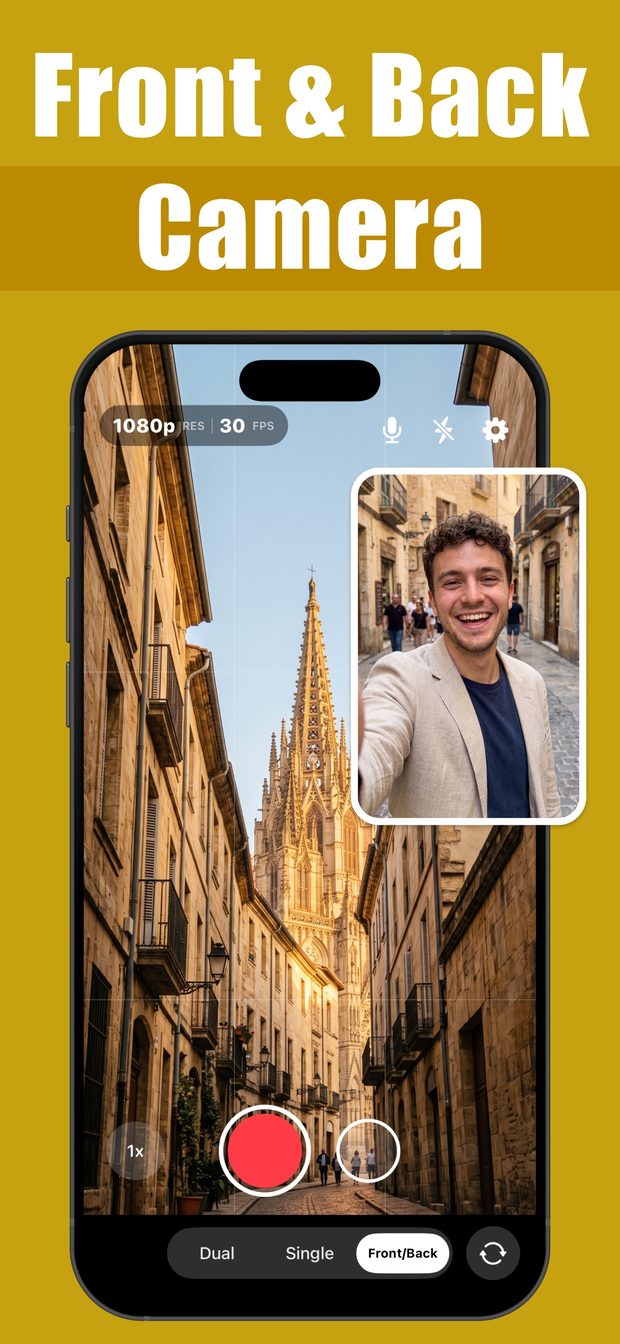
Front/Back mode: the back camera films a cathedral street while the front-camera selfie sits in a picture-in-picture inset Frame both cameras
Drag the small inset to the corner you want. Tap it to swap which camera is the main view. Turn on the grid or front-camera mirroring from the framing tools if you want them — all free.
Tap record, move the inset if you need to
Both cameras record together. You can keep dragging the inset mid-take; the position you choose is what gets saved.
Stop and find the file in Photos
The picture-in-picture video is saved straight to your Photo Library, ready to share to YouTube, Reels, Shorts or TikTok. Free videos carry a small watermark in one corner.
What this cannot do
- It cannot make an iPhone X or older record two cameras at once; that is a hardware limit, not an app limit.
- Free recordings are 1080p at 30 fps with a small watermark. 4K, 60 fps and a watermark-free file are premium.
- The App Store listing states iOS 16.0 or later and no per-model list; the developer has not published which models were tested.
- It records picture-in-picture into one file. It does not save the two cameras as two separate video files.
- iPhone only. There is no iPad or Android version.
Questions people ask
Can the iPhone camera record front and back at the same time without an app?
Only on the iPhone 17 lineup, where Apple's Camera app has a Dual Capture mode. On every earlier iPhone the built-in app records one camera at a time, so a third-party app such as Dual Camera is the way to do it.
Is there a free app to record front and back camera at the same time on iPhone?
Yes. Dual Camera is free to download with no account and no time limit. The free tier records both cameras at 1080p and 30 fps in the Wide picture-in-picture layout and adds a small watermark; premium removes it and unlocks 4K, 60 fps and four more layouts.
Where does the video go?
Straight into the iPhone Photo Library as a normal video file, so it shows up in Photos and in any editing or social app that reads your camera roll.

Dual Camera: Front Back PiP
Front and back camera in one PiP video, one take saved as 16:9 and 9:16.