Stamp Diary: Collect Stamps app icon
Photo & Video · Lifestyle · Free

Stamp Diary app: turn daily moments into collectible stamps

A notebook-style memory journal for iPhone where every photo becomes a stamp.

  • Free · In-app purchases
  • iPhone · iOS 16+
  • 23 MB
  • Age 4+
  • Updated September 2026
  • 6 languages

Screenshots

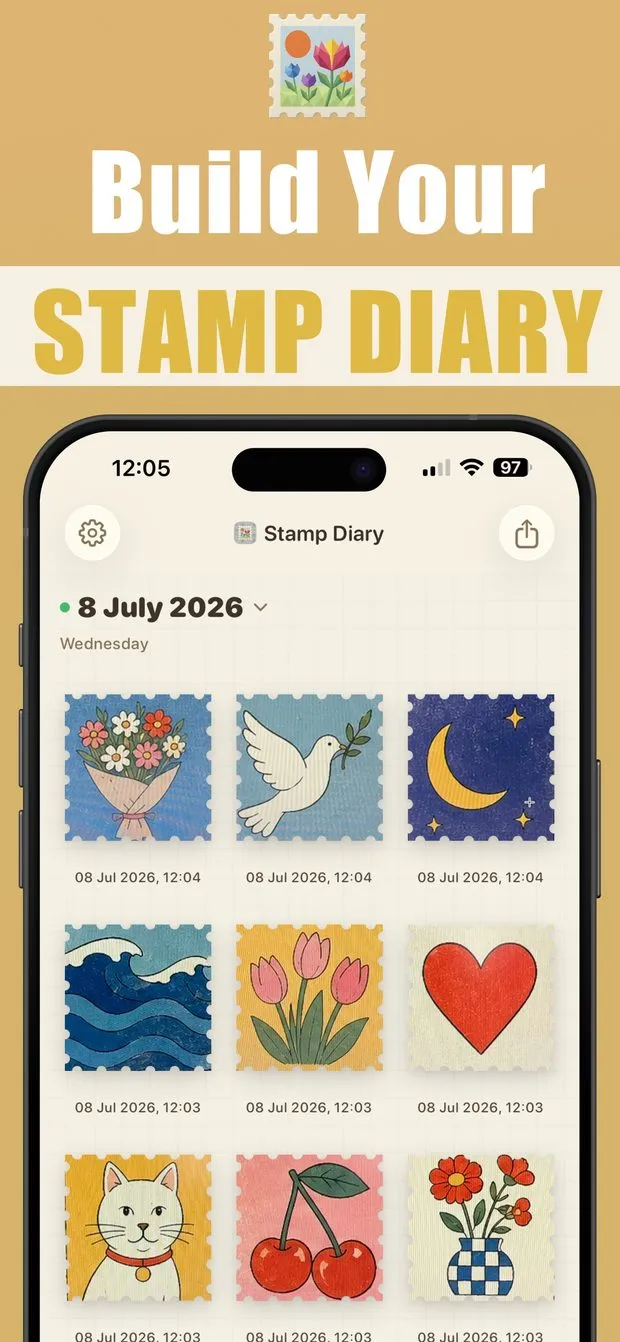
Stamp Diary page for 8 July 2026 showing a 3-by-3 grid of illustrated stamps, each labelled with its capture date and time
Page-flip animation from a filled day to a new empty page, with a Today button and a note that there are no stamps yet
iPhone Home Screen with a medium 'Latest Stamp' widget and two small widgets, each showing one stamp and its date
In-app camera with a perforated stamp-shaped frame over the viewfinder, plus shutter, Square toggle and photo library buttons
A day's diary page exported as a single image and opened in a social story editor, ready to post
Single stamp detail view: a beach photo with perforated edges, an emoji, the capture time and date, and a share button
Collections screen listing All Collection (9), Favorites (3) and a custom Flowers collection, with a plus button to add more

Stamp Diary at a glance

Developer
Burak Köse, independent
Platform
iPhone · iOS 16 or later
Core use case
Turn daily moments into collectible stamps in a notebook-style diary.
Key differentiator
Capture moments as stamps
Account
Not stated in the listing
Internet
Not stated in the listing
Your data
See the privacy policy
Pricing
Free download · optional in-app purchases
Version
1.0.6 · September 2026 · 23 MB
Download
App Store

Stamp Diary: Collect Stamps is a free stamp diary app for iPhone that turns daily moments into stamp-shaped entries on a page-per-day diary. It is for memory keepers, travelers and hobby collectors who want a visual record rather than a text journal. Unlike a plain photo album, each stamp lands on its date, can be named and favorited, and can be grouped into custom collections you can rename.

Capture moments as stamps

Frame a moment in the stamp-shaped viewfinder, tap the shutter, then name and save it. Each stamp carries its date and time and lands on that day's page.

One notebook page per day

Flip through dates like a real notebook. Each page shows only that day's stamps, so the timeline stays readable after months of entries.

Custom collections and favorites

Group stamps by theme, trip or mood in collections you can rename or edit at any time. Built-in All and Favorites collections are always there.

Share a page in one tap

Export a day's page or a collection snapshot as one clean image that looks right on social media, then post it or send it to friends and family.

App that turns photos into postage stamps on iPhone

Stamp Diary's capture flow is built around the stamp itself. Open the in-app camera and a perforated, stamp-shaped frame sits over the viewfinder, so you compose inside the final shape instead of cropping afterward. A Square option sits next to the shutter, a flip button switches between the front and back cameras, and a library button lets you pick an existing photo from your camera roll instead of shooting a new one.

After the shutter, you name the stamp and save it straight to your diary. Every stamp is marked with its capture date and time (for example '08 Jul 2026, 12:04') and placed on that day's page, so the timeline builds itself. Open any stamp later to view it full size, attach an emoji, edit its name or details, or share it on its own. This is what makes it a photo stamp journal app rather than only a stamp camera app with stamp-shaped viewfinder: the stamp is the entry, not just an export.

How to organize photo stamps into custom collections

The Collections screen starts with two built-in sets: All Collection, which holds every stamp, and Favorites, which fills up as you mark stamps for quick access. Below them sit your Custom Collections. Tap the plus button, give the collection a name such as 'Travel', 'Rare Finds' or 'Flowers', and add stamps to it; the Flowers card in the screenshots shows a preview row of its stamps, a count of 3 and the date 8 Jul 2026.

You can rename or update a collection anytime and add or remove stamps. The same stamp can appear in more than one set: in the screenshots the bouquet stamp sits in both All Collection and the custom Flowers collection. The description says the collection stays tidy and searchable, so this digital stamp album app stays easy to browse.

  • Create collection lists by theme, trip, mood or category
  • Rename and update collections at any time
  • Add or remove stamps from a collection
  • Mark favorites for quick access
  • Edit stamp names and details whenever you like

Notebook-style diary app with a new page for every day

Most photo journals show an endless scroll. Stamp Diary is instead a daily photo diary app, closer to a one-photo-a-day journal: one page per day, in a page-based layout that behaves like a paper notebook. Each date gets its own page, the page shows that day's stamps in a grid with their times, and moving between days is a page flip. A Today button jumps back to the current date, and the description says you can flip through dates to revisit earlier entries.

An empty day is not hidden; it appears as a blank page with a note that there are no stamps yet, which is a small nudge to capture something. The point of the design is focus: you see one day at a time without clutter. The same page layout is what gets exported when you share, so this aesthetic visual diary app for iPhone looks the same on screen and in a post.

Stamp diary app with iPhone Home Screen widgets

Stamp Diary ships with Home Screen widgets, shown in its App Store screenshots. The medium widget is labelled 'Latest Stamp' and displays the most recent stamp beside its date and weekday; the small widget shows a single stamp with its date. Placing one on the Home Screen means the last moment you captured is visible without opening the app, which works as a gentle reminder to add today's page.

Widgets are not mentioned in the App Store description; the screenshots are the source, and they show one medium and two small widgets on an iPhone Home Screen. The two small widgets in that screenshot show different stamps from the medium one, so the small widget is not limited to the latest stamp; the listing does not document how each widget picks its stamp.

How to share a diary page as an image on social media

Sharing in Stamp Diary is one tap from the share icon at the top right of a page. The app renders the whole day (header, date, weekday and stamp grid) as a single clean image so you can send it to any app. In the screenshots the exported page is opened in a social story editor, which is the intended use: the layout is built to look right in a post or story without extra cropping.

The same works for collections: you can share a collection snapshot instantly, and single stamps have their own share button on the detail view. The description frames this as celebrating milestones in your stamp journey, but a plainer use is sending a day's page to family in a group chat instead of nine separate photos.
How it works

How to turn a photo into a stamp in Stamp Diary

  1. Open the camera flow

    Open the in-app camera. A perforated stamp-shaped frame appears over the viewfinder.

  2. Frame or pick a photo

    Compose the moment inside the stamp frame, or tap the library button to choose an existing photo. Use the Square toggle or the flip button if needed.

  3. Capture and name it

    Tap the shutter, then give the stamp a name and save it to your diary. It is placed on today's page with its capture time.

  4. Favorite or file it

    Mark the stamp as a favorite, or add it to a custom collection such as a trip or a theme. You can rename collections later.

  5. Share the page

    Tap the share icon to export the day's page as one image and post it or send it to friends and family.

Made for

Who Stamp Diary is for

Daily visual diary

Capture a few moments a day; each lands on that date's page with a timestamp you can flip back to later.

Trip stamp collection

Create one custom collection per trip, add stamps as you go, and share a snapshot of the set when you are home.

Family memory keeping

Send a whole day as one page image to a family chat instead of a stream of separate photos.

Hobby collectors

Scan stamps you find with the camera and keep them in named sets like 'Rare Finds' as a personal digital album.

Home Screen reminder

Put the Latest Stamp widget on your Home Screen so yesterday's moment nudges you to add today's.

Pricing

What is free and what Premium adds

Free No time limit

  • Free to download; the description and screenshots present the features below without marking any as paid
  • Capture stamps with the in-app camera or from your photo library
  • Notebook-style page for every day with page-flip navigation
  • Custom collections, favorites and name editing
  • Share day pages and collection snapshots as images
  • Home Screen widgets

Premium In-app purchase

  • Optional in-app purchases are offered, as shown on the App Store listing
  • The current description does not itemize which features the purchases unlock
  • Check the In-App Purchases section of the App Store page for the up-to-date list

Offered as an auto-renewing subscription or a one-time purchase where available. Prices are shown in the app and vary by region.

Information

Stamp Diary: Collect Stamps at a glance

Developer
Burak Köse
Category
Photo & Video, Lifestyle
Price
Free, with in-app purchases
Compatibility
iPhone · Requires iOS 16 or later
Size
23 MB
Languages
English, Indonesian, Portuguese, Chinese, Spanish, Vietnamese
Age rating
4+
Version
1.0.6 · updated September 20, 2026
First released
March 29, 2026
App Store
Stamp Diary: Collect Stamps
Privacy policy
burakkose.me/privacy
Support
info.bk.apps@gmail.com
FAQ

Stamp Diary — frequently asked questions

What is the Stamp Diary app and what does it do?

Stamp Diary: Collect Stamps is a free iPhone app that turns photos and daily moments into stamp-shaped diary entries. You capture a moment through a stamp-shaped camera frame, name it, and it lands on that day's notebook-style page with its time. Stamps can be favorited, edited, grouped into custom collections, and shared as a single page image.

Is Stamp Diary free to download?

Yes. Stamp Diary is listed as Free on the App Store and the description does not mark any feature as paid. The listing does include optional in-app purchases; the description does not itemize what they unlock, so check the In-App Purchases section of the App Store page for the current list before buying.

Does Stamp Diary work on Android or iPad?

No. Stamp Diary is an iPhone-only app. The App Store listing does not include an iPad version and there is no Android or web version. It requires iOS 16.0 or later, so it runs on any iPhone that can install iOS 16, and the download is 23 MB.

Is Stamp Diary a stamp collecting app for real postage stamps?

Partly. Stamp Diary is built around turning your own photos and daily moments into stamp-shaped entries. Its description does mention scanning new stamps with the camera and lists stamp collectors and hobby collectors among its audience, but it does not describe a philatelic catalog, stamp identification or price valuation. For cataloguing a physical collection with values, a dedicated philately app is a better fit.

Can I put Stamp Diary stamps on my iPhone Home Screen?

Yes. Stamp Diary's App Store screenshots show Home Screen widgets: a medium widget labelled 'Latest Stamp' that displays the most recent stamp with its date and weekday, and small widgets that each show a single stamp with its date. Add them the usual way, by long-pressing the Home Screen and choosing Stamp Diary from the widget gallery.

How do I share a diary page from Stamp Diary?

Tap the share icon at the top right of a day's page. Stamp Diary exports the page, including the date header and stamp grid, as one clean image so you can send it to any app: post it to a story, send it in a chat or save it. Collection snapshots and single stamps can be shared the same way.

What languages does Stamp Diary support?

Stamp Diary is localized in six languages: English, Indonesian, Portuguese, Chinese, Spanish and Vietnamese. Like other localized iOS apps it follows the language set on your iPhone; there is no in-app language switch mentioned in the description.

How is Stamp Diary different from a normal photo journal app?

Three things. Every entry is a stamp with perforated edges rather than a plain photo, captured through a stamp-shaped viewfinder. The diary is page-based, with one page per day that you flip like a notebook, instead of an endless scroll. And stamps can be filed into custom collections by theme, trip or mood on top of the date timeline.