How to control an iPhone teleprompter with a remote, foot pedal or keyboard
Pair the device with your iPhone, open the prompter, and drive the script without touching the screen. Teleprompter accepts Bluetooth presentation remotes, foot pedals, keyboards, game controllers and Siri Remote, all in the free version. On a keyboard, Space plays and pauses, R restarts, the arrow keys change speed, brackets jump between cue points, C starts or stops recording and M toggles the mirror.
Keyboard shortcuts
These are the commands shown in the app's Remote Control settings. Most Bluetooth clickers and pedals send key presses, so they map onto the same actions.
| Action | Key |
|---|---|
| Play / pause | Space |
| Restart from top | R |
| Scroll faster / slower | ↑ / ↓ |
| Bigger / smaller text | + / − |
| Next / previous cue point | ] / [ |
| Start / stop recording | C |
| Toggle mirror | M |

Which device to use
A foot pedal keeps both hands free for a speech or a demo. A presentation clicker suits a stage. A game controller is the easiest wireless option if you already own one. A keyboard gives the full command set. Siri Remote works when the script is shown on an Apple TV over AirPlay.
Script on a second screen
For a speaker reading from a monitor, the app sends a clean feed of the script over AirPlay or HDMI while you control it from the phone or a remote. For glass rigs, see mirror mode for beam-splitter rigs.
Set up a remote
Pair it with the iPhone
Put the remote, pedal, keyboard or controller in pairing mode and connect it in the iPhone's Bluetooth settings.
Check it in Remote Control
Open the app's Remote Control settings; a connected controller appears under Connection with the commands it drives.
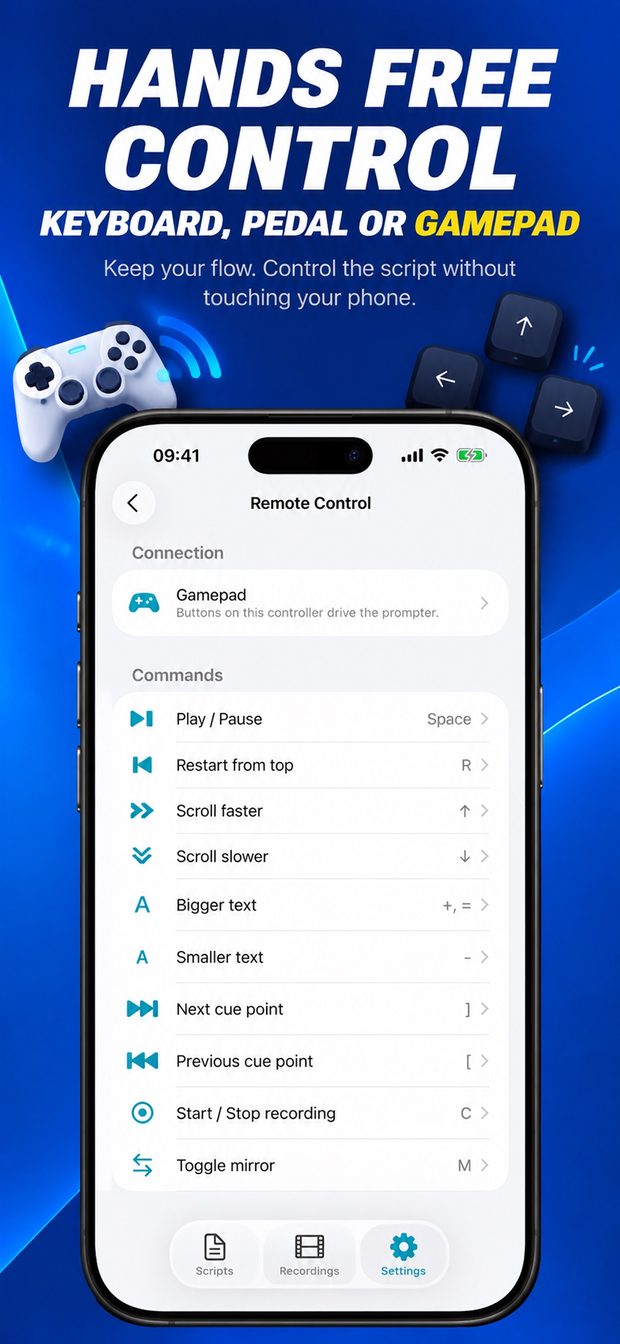
Remote Control settings with a gamepad connected and keyboard shortcuts for play, speed, text size, cue points and recording Rehearse once
Start the prompter and try play, pause, speed and cue-point jumps before the real take.
What this cannot do
- Exact button mapping differs between remotes and pedals; test yours in the Remote Control screen before a live event.
- Apple Watch control is not listed among the supported remotes.
- iPhone only, iOS 16 or later.
Teleprompter: Script to Video
Script under the camera that follows your voice; record in 4K, export captions.